Saturday, March 17, 2012

Apps useful for my trip to London


Recently I traveled to London. I am not much of a photographer, neither in frequency of shots taken, nor, as many will rightly say, in quality of shots, but having the 4th generation iPod Touch with its camera led me to take some shots, like this one of the Big Ben Clock Tower.

In preparation for the trip, I created a (free) Google Voice account which would be able to call U.S. (and Canada, I believe) numbers for free until the end of 2012 (I believe that was extended from its original end of 2011 cut-off date) 2013 (http://gmailblog.blogspot.com/2012/12/free-calling-within-us-and-canada.html). A knowledgeable friend had advised me that such an account could be used by the (free) Talkatone app to turn the iPod into a phone (1/3/14: That capability is ending on 5/5/14 due to changes by Google; see, for instance, the 10/31/13 post on https://www.facebook.com/talkatone.). I installed Talkatone, and despite a few hiccups during stateside testing, it worked quite well from London, allowing me to retrieve some messages from my answering machine. After returning from London I did a little more testing and, on one occasion, I was surprised that I could call a landline but could not reach a cell phone. Anyway, the combination of these two things served me well across the pond, even if the sound quality is not great.

I loaded up some additional free apps for the trip, listed below in approximate order of usefulness. Some of them would have been more useful, except I had alternate, more helpful, resources, which I will also mention.
  • London: Travel Guide - Time Out has assorted information about London.  I did browse this a bit, but it was of minimal use to me because I had the good luck to borrow from the library the (more useful) 2010 Kindle e-book of Time Out London, which I consulted instead.  I also had several similarly recent, printed London travel materials on loan from a friend.
  • Brighton Museums was good for £1 off entry to the Royal Pavilion in Brighton (about an hour by train from London).  It has photos and brief information about the Royal Pavilion and other attractions, but its primary benefit to me was the discount.
  • Tube Map has, in addition to a map of the London Underground ("the Tube"), a Lines button which shows up-to-date information by subway line, e.g., "Good service", "Planned closure", "Part closure", "Line issue" (all of which I am seeing as I write this entry).  A small popup window may show periodically on the map with Tube alert-type information; I'm not sure if that overlaps with the Lines information.  The Tube Map app's buttons, advertising, and alerts naturally take up part of the iPod's precious screen space.  With hindsight I should have checked the Lines status each day before leaving the hotel (or leaving anywhere else I had WiFi), but I did not run into any meaningful Tube schedule disruptions (and at various stations I did learn in person of some minor scheduled service changes which were part of preparation for the coming Summer Olympics).  I had also loaded a PDF of the London Tube map (which I'd found using Google) onto the Dropbox app and saved it as a Favorite therein so that it would be available without WiFi access.  That was my real Tube resource, and was extremely useful both for scoping out trips in advance and while on a train.  In the most extreme situations, when riding with only one hand free, it was still easy to use spread-to-zoom and swipe motions to confirm that I was on the proper train, which easily beat doing so using a clumsy folding map with tiny print.
    (3/21/12: With their 4.1 update, the makers of this app have added integration with their Bus London app, of which I just learned, and could have been handy for the Tate Britain museum, which is a bit of a walk from the nearest Tube station. Supposedly within the Tube Map app, you can now find bus departures around a Tube station.)
  • Hidden London contains photos and information about some less well-known attractions.  Although I had mentally noted some of those attractions before the trip, in the end it was only by accident that I happened to walk by one (the Cartoon Museum) and actually went to one (the Cafe at Tate Britain).  Regarding the latter, I had gotten confused about museums and went to the Tate Britain instead of the Tate Modern, but as this app notes, this "little know[n] excellent cafe hides in the basement of this grand art gallery.  Open daily, the cafe serves amazing cakes, snacks and a range of tea and coffee."  The cafe truly was excellent!
  • ExCel London provides some general information, including food availability, about the convention site, which would presumably only be of interest if you are attending an event there.
  • i-Shop has some information about possible discounts or tax refunds from selected shops.  I did see the Global Blue symbol (Global Blue is either the producer or somehow related to this app) inside the Tower of London gift shop, but I did not buy enough stuff to make serious investigation of this app worthwhile.

In addition to the Time Out London e-book mentioned above, I also borrowed a recreational reading e-book from the library before the trip.  Library e-books "return" themselves, so you never need to worry about them (unlike the half-read physical book which I had to return to the library on my last night in the U.S. during last minute trip preparations!).  I also bought an e-book for the Kindle app, so was well stocked with reading material.

The Notespark app, which I originally wrote about here, facilitated organizing London topics and a daily schedule.  I used a particular Tag for all London notes, and starred all of those notes.  Most of the time I would just work with the group of Starred notes.  I also dedicated a single note for each day's potential agenda, an agenda which often went through revisions.  When the contents of any note were no longer relevant for the remaining days of my trip (although I expected to revisit all London notes after the trip), I unstarred that note so that it would no longer be visual clutter.  I could use Notespark to search through whichever group of notes was more relevant, the Starred ones, or the group associated with the Tag which I used for this London trip.

When I had WiFi access both before and during the trip, I saved static copies of a number of London-related web pages, e.g., for various tourist attractions and travel tips, using the Opera Mini browser (about which I wrote most recently here).  I'll admit that despite getting a bunch of information in advance about Oyster Cards and Travel Cards (both of which are options, pointedly not mutually exclusive, for using the Tube and some other transportation systems), it wasn't until pretty late in the trip that I felt I really got a fuller understanding of them.

    Thursday, March 15, 2012

    The color of Taiwan politics, plus u versus ü Pinyin sounds

    I had a recent conversation with a native Chinese speaker about political groups in Taiwan.  The group which leans toward unification with China is "blue", while the other group preferring formal or informal independence from China is "green".

    She mentioned lán yíng, whose first word I knew must be 藍 (blue), but I had to ask what the second word was.  She explained that it was "camp" -- much as it is used in English when discussing politics.  So her original reference was to 藍營.

    Camping, I said, according to my recollection, was lù yíng (露營). She then mentioned lǜ yíng (double dots over the u), which made me think that I had misremembered the vowel in the first syllable in camping, and I (mistakenly) switched to lǜ yíng as the pronunciation for "camping". She then clarified that she had said lǜ yíng (綠營), referring to the green camp.

    While there are surely other common expressions of 2 or more syllables which might be mentioned together where u and ü are both possible as the only difference between corresponding syllables (tones and all other aspects of the letters being the same), I found 綠營 (lǜ yíng) and 露營 (lù yíng) to be an interesting pair.

    Wednesday, February 8, 2012

    ShuBook e-book reader app mostly shines with Chess Fundamentals ePub e-book

    5/12/12:  The relatively new e+ Chess Books app provides a far superior iPod reading experience for Chess Fundamentals than does any other e-book reader.  I am leaving this blog entry here primarily for historical perspective.


    I wrote my first blog entry on e-book reader apps back when I was using iOS 4. Under iOS 5, I observed loss of functionality in some e-book reader apps. I installed ShuBook as a potential substitute for Stanza, which initially fatally crashed under iOS 5 (though a final Stanza upgrade was eventually released, which worked under iOS 5).

    Each e-book reader app has its advantages and disadvantages. Developers make different decisions about how to render elements of an ePub book, which will be very clear in the examples below. Under iOS 5.0.1, ShuBook 1.4.2 (an older version, to which I'm sticking for now) mostly does a nice job rendering the public domain e-book of Chess Fundamentals, written by World Chess Champion José Raúl Capablanca. The up-to-date version of ShuBook may very well display this e-book in the exact same fashion, but I have no plans to test that.

    Amazon sells several Kindle versions of this freely available e-book, but perhaps they added meaningful value in some way to the Kindle editions. I downloaded mine for free using OverDrive to connect to my library's website, which had a link to public domain books. I opened the e-book successively in Stanza, iBooks, ShuBook, and OverDrive. I initially had a problem with OverDrive, but deleting the app and downloading it again got it working again.

    The print book has embedded chess diagrams, an example of which is shown here:


    Both Stanza and iBooks simply mimic the original book's placement of those diagrams, though they use surprisingly small diagram images:


    My (22nd edition) print book's page is around 4 times the size of the iPod screen.  As is clear above, on the iPod it is not so easy to see those diagrams, which were of poor quality even in the print book.

    OverDrive puts each diagram on an entire page, but squished to the degree of being essentially useless:


    ShuBook (Shū is the Pinyin spelling for the Chinese word for book) also presents each diagram as an entire page image, but done the way it should be (which may help the reader focus on evaluating the position without "peeking" ahead at the explanation). To enhance the text, I used these settings, which I think are all changes from the defaults:

    • Font Name: Arial, which is sans serif, feels easier to read given that I also use:
    • Font Size: extra small
    • Text Alignment: left (justify works badly for many of the chess moves in the text on the iPod)


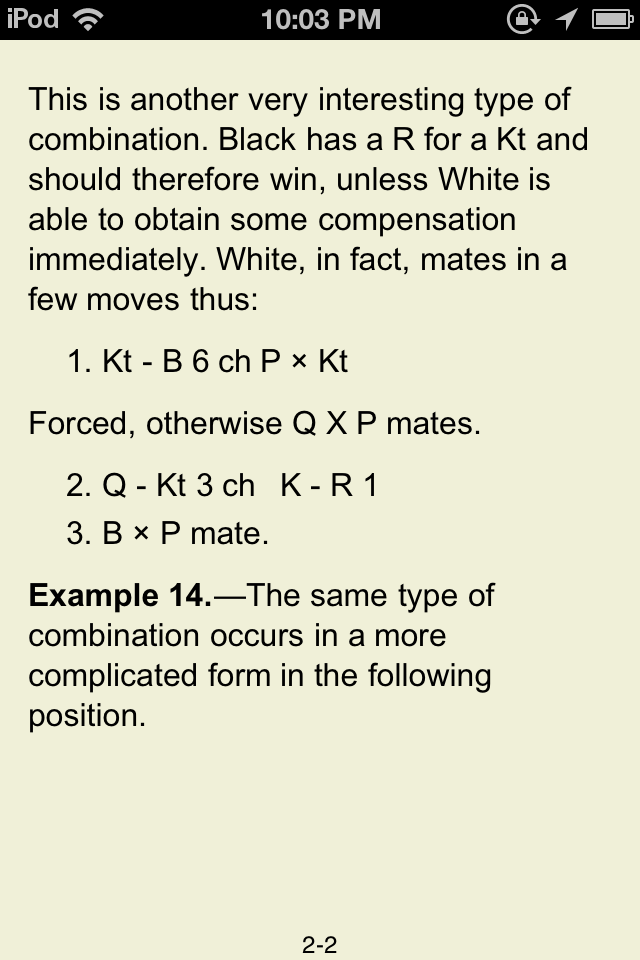
    I was disappointed, however, to discover that ShuBook lost some text right after the Example 14 diagram, which would appear to be a direct consequence of its superior handling of images. The text is complete in ShuBook on the iPad (4/7/12: in portrait orientation only), where this e-book is even more of a pleasure to read with the larger screen size, but this blog's focus remains the iPod Touch.

    Here are Stanza, iBooks, and OverDrive properly rendering the moves:


    Now, here is ShuBook missing the moves "1. BxKt QxB.":


    For the time being I will keep a copy of the e-book in all 4 of these apps, and intend to continue documenting other differences I find.


    Shubook may be similarly helpful for other ePub format e-books having similarly small images embedded between text, though there is an apparent risk of losing some text.


    No e-book reader, of course, will ever suffer from show-through of text on the other side of a printed page!
    (...unless they are simply displaying scanned images of a print book, that is.)

    Sunday, February 5, 2012

    The pronunciation of jaune (yellow) in French

    A Frenchman mentioned to me today that the au vowel sound in jaune (yellow) is often mispronounced, even by native French speakers, like an English "aw" sound (as in awning), when it should be pronounced like an English long o sound (as in lone).  I realized that I have been making this same mistake for years, possibly influenced by a misplaced expectation for the sound to be like the one in the English word jaundice, which shares the same first four letters.

    However, there are many French words wherein the au vowel sound is pronounced like an English long o sound, e.g.:

    • au (to the)
    • chaud (hot)
    • gaufre (waffle)
    • haut (high)

    so it seems clear to me that the vowel sound in jaune should be pronounced similarly.

    This Frenchman said that many people from the Marseille region in France use this "mistaken" pronunciation, although he would classify it more as a regional variant.  Personally, I will try to break my longstanding "mistake", since I prefer to emulate standard Parisian French, and I will make enough other mistakes trying to do so!

    Saturday, February 4, 2012

    iPod: from 3rd to 4th generation under iOS 5.0.1

    A while back, my 3rd generation iPod crashed so hard under iOS 4.3.5 that it "lost its mind". I used PC iTunes 10.5.0.142 to load iOS 5.0.1 onto its wiped-clean "mind", but its longstanding port hardware problem soon thereafter became so serious that I could no longer charge it without precariously holding the cable just right (for the entire charging period, something I wasn't about to do).

    I got a 4th generation iPod which was initially at iOS 4.3.3, and got errors when trying to reload it with iOS 5.0.1. The Apple error message's first recommendation was to update PC iTunes, which I did, bringing it to 10.5.1. It seems logical enough that Apple might require the latest version of iTunes for such operations. I was then able to bring the iPod up to iOS 5.0.1.

    In PC iTunes, I then attempted to Restore from Backup. There were two backups, one from my initial activation of the 4th generation device (and therefore not useful), and another of the 3rd generation one from 6 days earlier. Attempts to restore from the second (chronologically earlier) backup failed, reporting that the backup session failed.

    More recently I had been doing backups to iCloud, and two of those backups were there. The first had virtually no data from my activation of the new iPod minutes earlier and was therefore not of interest. The earlier one was from 2 days earlier (from the 3rd generation iPod), and I began restoring from that. Ah, the beauty of the iOS 5 backup over WiFi, which takes place when you are charging at an outlet. You always have to charge; backup is a perfect thing to occur alongside.

    The iPod reported that some items could not be downloaded, but that I could restore them if I had them on my (PC) iTunes by doing a sync operation. The following apps were not restored from the iCloud backup because they were no longer available in the App Store (Could there be any other reason why an app wouldn't have been restored?), but I still had them in my PC iTunes:

    • CED
    • Go To There
    • InstaPaper Free

    My outgoing 3rd generation iPod still had some battery charge (I had been conserving the remaining charge with Airplane Mode, turning it off, turning the brightness down all the way), so I could visually compare if any other apps were missing after the PC iTunes sync.

    PC iTunes lists the device, presumably purely cosmetically, as a 3rd generation iPod.

    I did a certain amount of work resetting app configurations and restoring data from servers associated with the apps.

    Assorted impressions of the 4th generation iPod:
    • Great to have cameras. I had recently been at the scene of an accident with my camera-less 3rd generation iPod, and stayed as one of the witnesses for the police who eventually came. If I had had this back then, I would have snapped pictures which would clearly have shown the policeman that the errant driver was in the wrong lane at the time of the accident. Fortunately I believe enough witnesses corroborated that anyway. You can also use the front-facing camera to use the iPod as a pseudo-mirror.
    • The addition of a microphone changed (downgraded) what Apple included as earphones (my blog entry).
    • The power button was moved to a more awkward position away from the top edge, making turning it on/off and taking screenshots (press power button + home button) clumsier. Maybe the new placement was needed because of the cameras or other hardware issues.
    • Volume buttons were similarly moved to a more awkward position away from the side edge.
    • The 3rd generation iPod's screen always looked great to me, but the Retina display of the 4th generation iPod is even sharper. My Opera Mini browser's saved Speed Dial images looked worse than they had on the old iPod, but simply recreating them fixed that. I had the initial impression that I needed the screen brightness to be slightly higher for the new iPod than for the old, but I'm no longer sure about that.

    The following links from a Google search for "restore from icloud" were of the most use to me:

    http://gigaom.com/apple/ios-101-set-up-and-restore-from-icloud-backup/
    http://support.apple.com/kb/HT4859
    http://support.apple.com/kb/ht1766
    http://heresthethingblog.com/2011/10/18/restore-iphone-ipad-icloud-backup/
    http://heresthethingblog.com/2011/07/21/wipe-iphone-android-phone/

    Friday, February 3, 2012

    Chinese translation: tea; chess

    These are a few examples I happened upon in casual conversations with native Chinese speakers.

    On one occasion, Mr. A mentioned "red tea", which puzzled some other folks who were also present. He was referring to 紅茶 (hóng chá), whose two characters indeed represent "red" and "tea", respectively.  However, in English we call the same drink black tea.  I could see the color of the tea being considered red (it's typically not black, really), but context trumps piecemeal translational validity, so he would have done better to say either "black tea" or just "tea".

    On a separate occasion, when referring to chess, Mr. B called it "international chess".  In China it's called 国际象棋 (guójì xiàngqí; 國際象棋 in traditional Chinese characters) where the first two characters represent "international" (probably in all other contexts) and the last two characters represent the game called "Chinese chess" in English.

    Chess is known by a different name in Taiwan:  西洋棋 (xīyángqí).  The first two characters represent "Western", while the last character represents any "chess-like" game (Go, incidentally, is 圍棋 wéiqí in Chinese; the first character represents "to surround", which I gather is what you seek to do to your opponent's stones in the game).  I tried to clarify for Mr. B that in the English language context it doesn't make sense to call the game "international chess" and that he should just refer to it as "chess".  When I subsequently contrasted Chinese chess vs chess, I called the latter "Western chess" to further distinguish it.  Although I was perhaps influenced by the Taiwan name for chess, I was thinking along the common idea of describing Chinese things as from the East and, e.g., American things as from the West, e.g., Eastern religions vs Western religions.

    Wednesday, January 18, 2012

    Wikipedia Mobile app


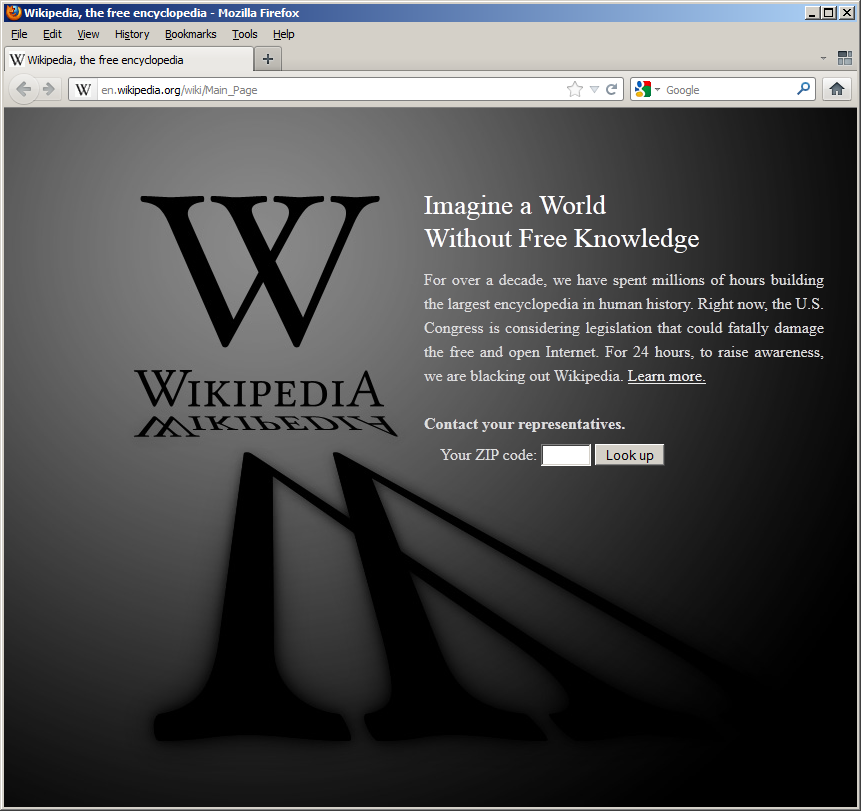
    Well, if you were trying to access Wikipedia's "standard" (non-mobile) site from a web browser today, you were out of luck, as shown above and detailed here. If you used the (free) Wikipedia Mobile iOS app (or, it seems, accessed the Wikipedia mobile site), however, you could continue to get Wikipedia information:


    Regardless of whether you agree with their decision to blackout their browser-accessed pages today, I encourage you to consider the value they provide, and if you are financially able, to contribute. Personally, I value the fact that they provide a great deal of useful text information adorned with a minimum of images, that they cover some topics (e.g., random items from pop culture -- Hot Wheels (TV Series), anyone?) that are not found in more conventional information repositories, and they do not run ads.